

No analog card. No weighing amplifier. No terminal in the cabinet. Just one M12 cable, and the weight is already in the PLC as a ready-to-use number in kilograms, 200 times per second.
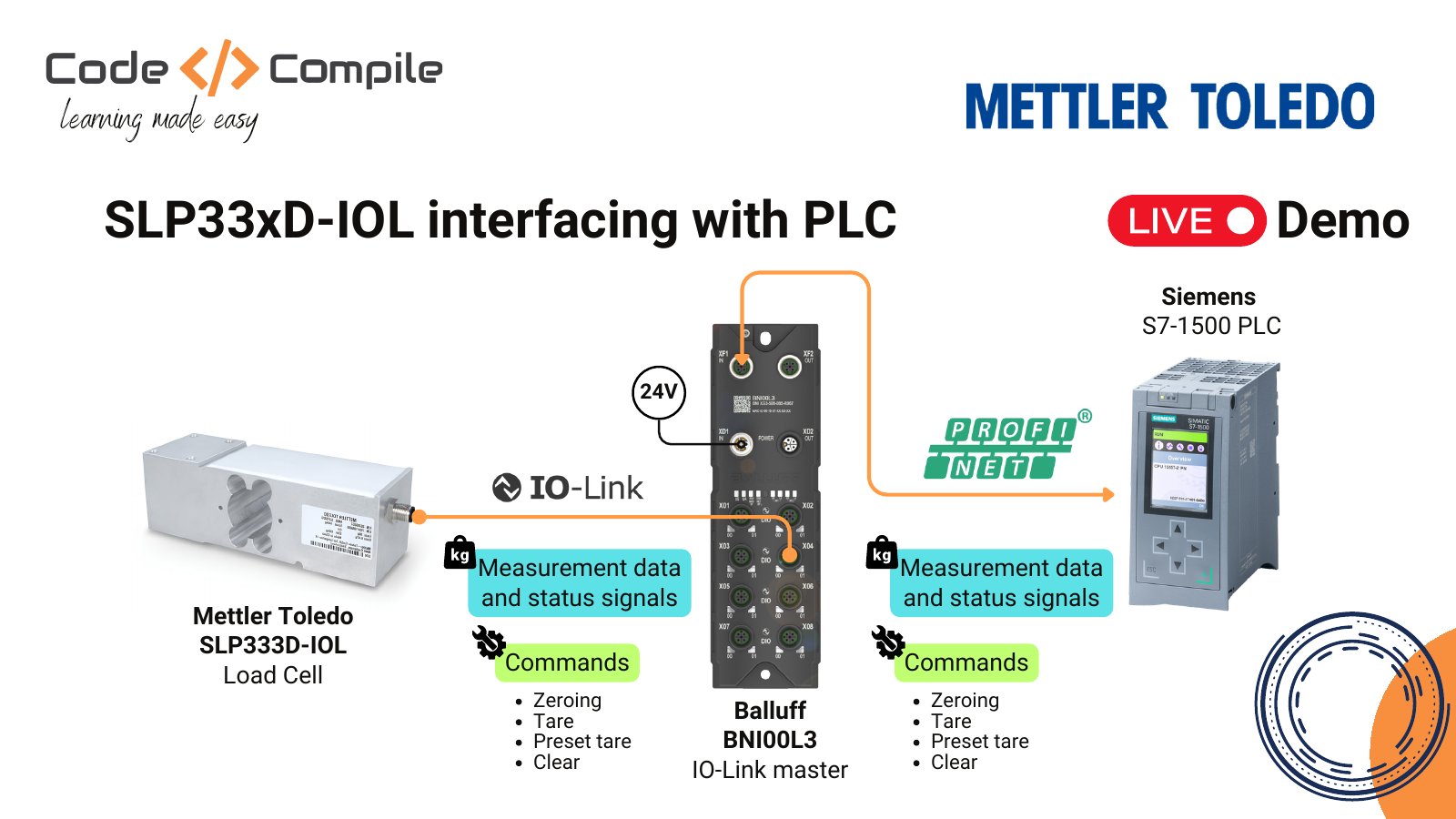
In this review I connect the Mettler Toledo SLP333D-IOL smart load cell to a Siemens S7-1500 through a Balluff IO-Link master, read the live weight in TIA Portal, and send tare, zero and unit commands, both cyclically and acyclically. At the end I swap the load cell to show what happens when one fails.
Why this load cell is different
A classic strain-gauge load cell gives you a few millivolts. You need an amplifier, a weighing terminal or an analog card, and then you still scale and filter the signal yourself. The SLP33xD-IOL does all of that inside the cell: filtering, temperature compensation, linearity, tare and zero run on the onboard electronics. It is a single-point load cell, so one cell is enough to build a complete scale. The family covers capacities from 5 kg to 750 kg. The cell in this demo is the 300 kg version.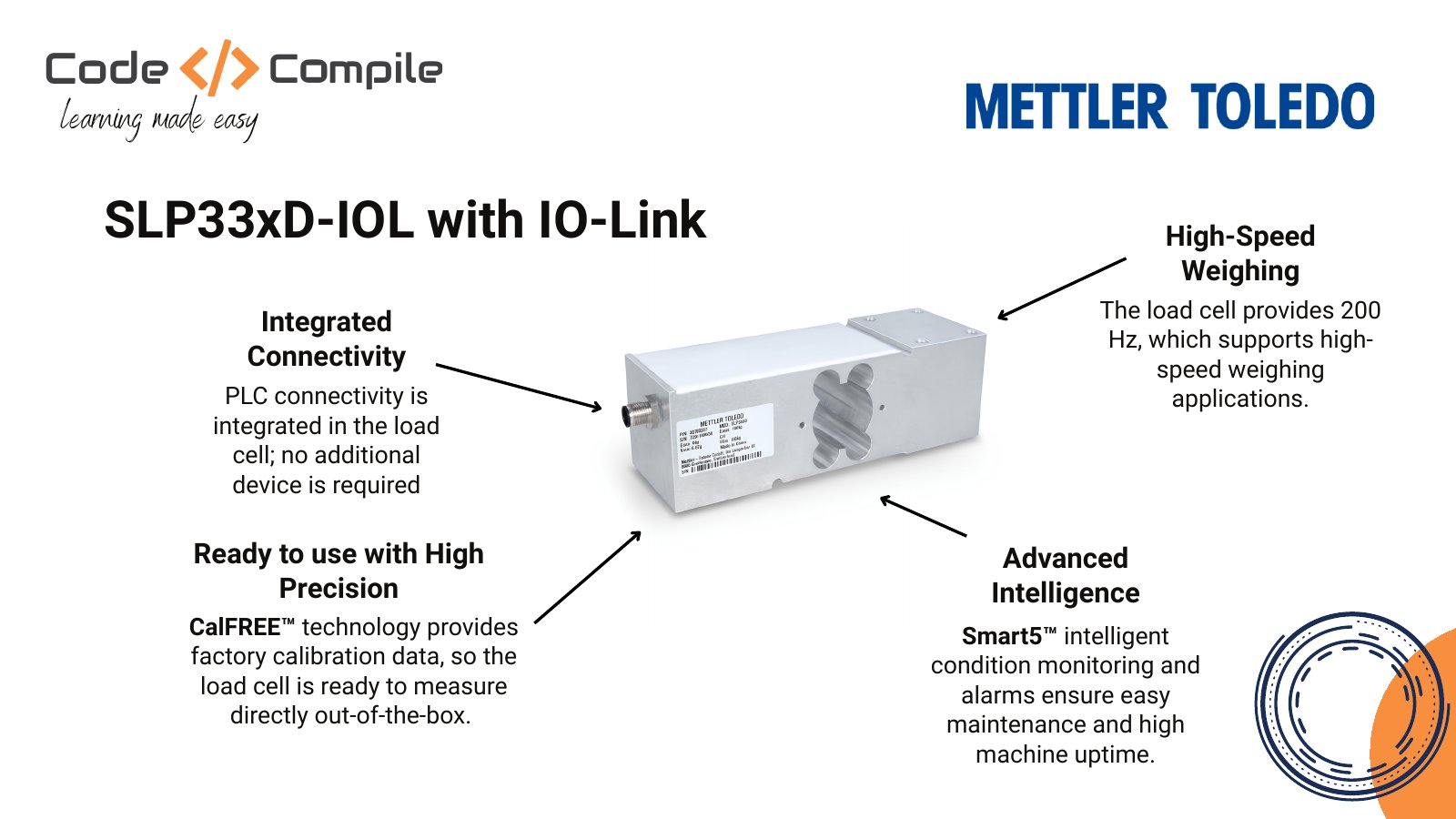
Integrated connectivity
IO-Link is built into the cell. You only need an IO-Link master and one M12 cable.
High-speed weighing
COM3 at 230.4 kbaud with a 64-bit cyclic frame: a fresh weight plus status 200 times per second.
CalFREE: ready out of the box
Factory calibrated, no test weight needed. You only set the geocode, so the cell knows where on Earth it is.
Smart5 condition monitoring
A five-level alarm system, from green (all good) to red (replace the cell), so the PLC knows the cell’s health.
Demo setup
Integration steps
1
Connect and power up
Plug the load cell into a free port of the IO-Link master with an M12 cable and power the master with 24 V. When the connection is good, the port LEDs turn green.
2
Add the IODD file to the IO-Link master
The IODD describes every parameter and process value of the device. Search for SLP333 on IODD Finder, download it, and upload it in the Balluff web interface under Settings → IODD. The project uses IODD version V1.2.1 (2026-06-01).
3
Check the measuring data in the IO-Link master
Open the port in the master’s web interface. You now see the device information and the live process data: weight, gross or net, motion, center of zero, data OK, heartbeat, Smart5 alarms, process status, weight type and unit. You can already zero the scale here with Zero immediately.
4
Configure the IO-Link master for PROFINET
Set the master’s IP address and PROFINET device name so the PLC can reach it.
5
Install the GSDML file in TIA Portal
Download the GSDML file of your IO-Link master (here Balluff) and install it in TIA Portal. Drag the master from the hardware catalog into Devices and networks and connect it to the PLC.
6
Import and configure the TIA Portal sample project
The cell has 8 input and 8 output bytes, so put the module IO-Link 08/08 byte on port 4. TIA Portal shows 9 bytes because 1 byte is the PQI (port qualifier). Then update the IP addresses, IO-Link addresses and PLC tags, and the tags in %FB1 (cyclic data) and %FB50001 (acyclic block).
7
Verify the commands
Go online, watch the live weight, and test tare, zero, clear and unit change. The sections below show exactly what to send.
Cyclic, acyclic and events
IO-Link moves data in three ways. An easy way to remember them: cyclic is a live video stream, acyclic is a text message, and an event is the doorbell ringing.
Acyclic requests run in parallel with lower priority, so they never slow down the cyclic weight.
Process data map
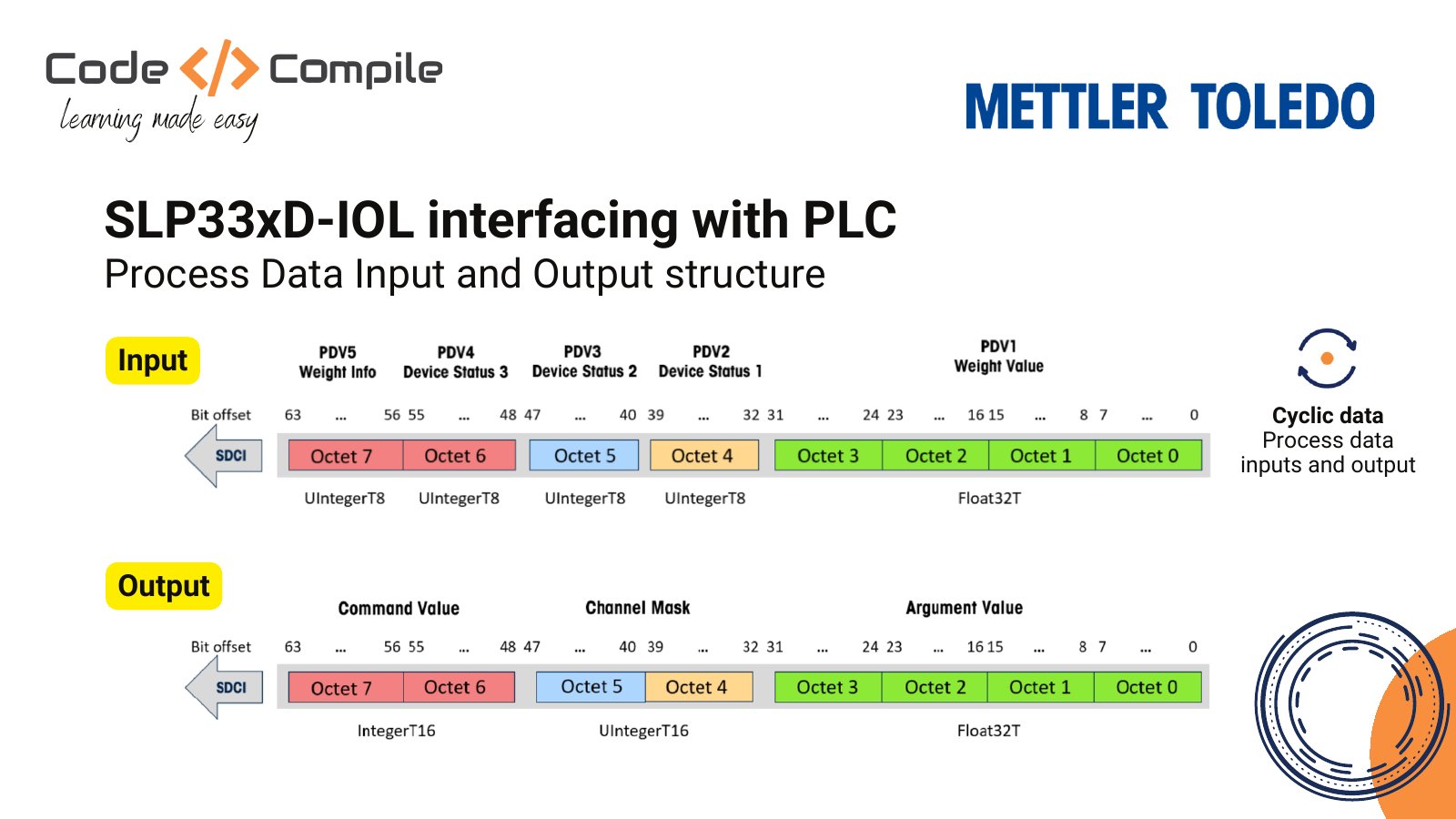
Outputs (PLC to load cell)
Command finder
Pick what you want the load cell to do and how you want to send it.Cyclic commands
Write the command number to the command value. When a command needs an argument, write the argument first, then the command.
Prefer stable over immediately: the stable commands wait for a settled weight.
Acyclic commands
Change the unit with a parameter write: index 545, subindex 0, length 1, value g = 0, kg = 1, mg = 3, lb = 7. Then trigger Write_AcyclicCommandWithParameter. System commands go to the system command parameter. Write the number, then trigger Send_SystemCmd.The trigger bit resets itself very quickly, so in the watch table you may not see it go true. Check the result in the process status and the weight instead.
What the live demo shows
Gross = net + tare. In the demo I put a small base on the cell (0.069 kg) and send Tare stable (400). The net weight goes to 0. Then I put the test object on top: net shows 0.196 kg. Switch the report to gross (command 0) and you get both together. After Clear tare (402) the tare is gone and the reading shows the full weight again. Events. When I sent an acyclic write with the wrong length (5 instead of 1), the cell raised an event. Event 8033 means parameter length overrun. Look up any event code in the manual.Replacing a failed load cell
Swapping the cell is plug and play: unplug the old one, plug in the new one. The PLC shows no load cell present the moment the cable comes out, and the new cell sends a weight as soon as it is connected. My tip: keep the unit, the geocode and the filter settings in the PLC, and write them to the cell after a replacement. Then the new cell is ready to weigh right away.Resources
TIA Portal project
The project from the video, with the cyclic block (%FB1) and the acyclic block (%FB50001). Download link coming with the video.
SLP33xD-IOL product page
Capacities, accessories and downloads from Mettler Toledo.
Datasheet
Technical data of the SLP33xD-IOL family.
User manual
Status bits, parameters, system commands and event codes.
IODD Finder
Search for SLP333 to download the IODD file.
More Mettler Toledo reviews
IND400, IND360 and IND590 with MQTT, API, PROFINET and OPC UA.
Learn IO-Link in TIA Portal

Siemens S7-1200 PLC and HMI (Advanced)
Advanced Siemens PLC programming in TIA Portal: IO-Link, RFID, smart lights and HMI scripts.
Get my courses – 20% off
Use code WIKI at checkout for 20% off every course.